


YouTube Shorts Ads: Vertical Video That Works
Most YouTube Shorts campaigns fail for one reason: horizontal creative letterboxed into a vertical feed. What Shorts ads actually are, how the inventory is bought, and what vertical video really requires.
By Bharathidasan Moorthi

Almost every underperforming YouTube Shorts campaign we look at has the same problem, and it is not the targeting or the bid. It is a 16:9 video that was cut for a horizontal player, dropped into a vertical feed, and left sitting in the middle of the screen with black bars above and below it.
A viewer swiping through Shorts is moving fast. Letterboxed creative announces itself as an ad before the first frame has registered, and it gets swiped past. The account owner then concludes that Shorts does not work for their business, when what did not work was the aspect ratio.
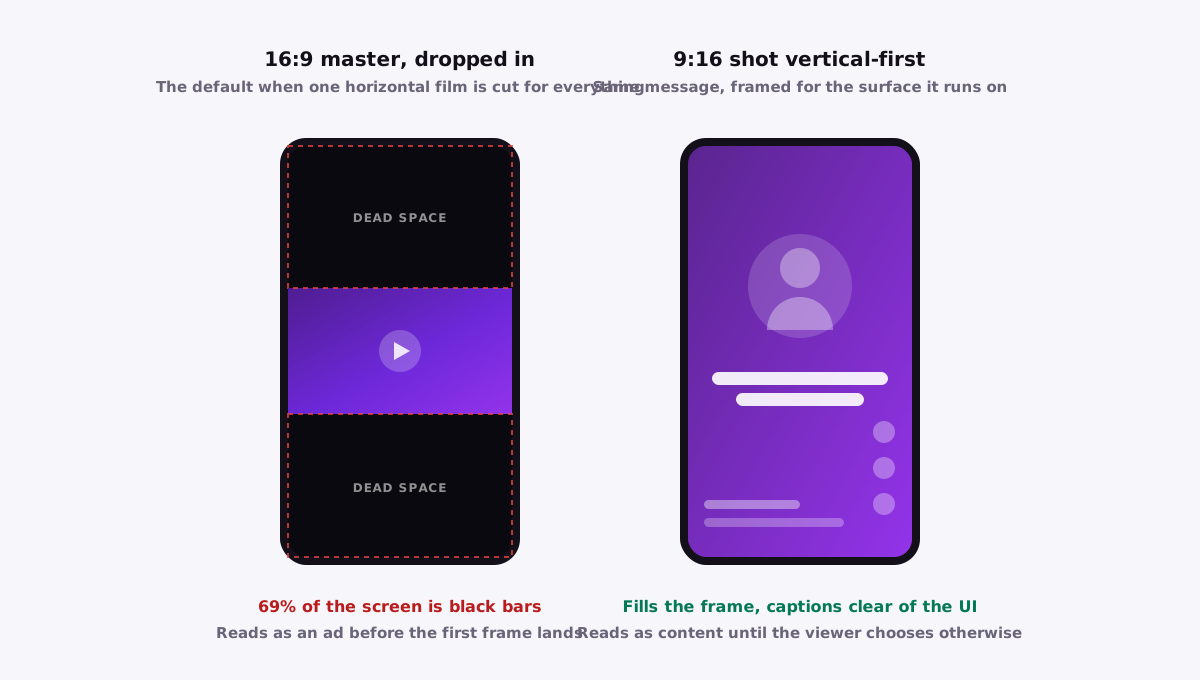
69%
of a vertical screen is black bars when a full-width 16:9 asset is dropped into it
A 16:9 video at the full width of a 9:16 screen fills 126 of 411 pixels of height.
Shorts is the fastest-growing surface on YouTube and, for now, some of the cheapest attention on the platform. Here is how the inventory is actually bought, what vertical creative has to do differently, and why anyone already producing Instagram Reels is far closer to running it than they think. If you are still deciding which YouTube format to use at all, start with the format comparison.
What a YouTube Shorts ad actually is
Shorts ads are vertical, full-screen video ads that appear between Shorts as the viewer swipes through the feed. They play with sound on by default, they fill the whole phone screen, and the viewer can leave at any moment by swiping up.
That last point is the mechanical difference that matters. A skippable in-stream ad gives you five protected seconds before the skip button becomes active. In Shorts you get none. There is no timer, no gate, nothing holding the viewer in place.
The swipe is the skip, and it is available from frame one. The first second is not a warm-up. It is the entire audition.
- Placement: between Shorts in the vertical swipe feed
- Orientation: vertical, full-screen, 9:16
- Sound: on by default, unlike most social feeds
- Skip behaviour: instant, by swipe, with no protected window
How Shorts ads are bought and served
This is where most explanations go stale within six months, because Google renames YouTube campaign types regularly. So here is the part that stays true regardless of what the interface calls things this quarter.
Shorts is a placement, not a campaign type. You do not usually buy a standalone Shorts campaign. You run a video or demand-generation campaign, supply vertical assets, and Shorts becomes one of the surfaces your ad is eligible to serve on alongside in-stream and in-feed. Several campaign types can reach Shorts inventory, including video campaigns built for reach or action, demand-generation campaigns, app campaigns, and Performance Max.
Before you scale anything, check your placement or 'where ads showed' reporting to see how much of your spend actually landed in Shorts versus in-stream. Reporting granularity varies by campaign type, and it is worth confirming rather than assuming. Judging a campaign on blended numbers when 80 per cent of the spend went to in-stream tells you nothing about whether Shorts worked.
What vertical creative actually requires
Shooting for Shorts is not a cropping exercise. A handful of things change, and they change together.
The hook moves to the first second
On in-stream you have five seconds to earn the sixth. Here you have roughly one. Whatever the strongest visual or claim is, it goes at the top with no logo sting, no establishing shot, and no slow zoom into a product.
The frame gets tighter
Vertical is a narrow, tall window on a screen held at arm's length. Faces should be large, products should fill the frame, and wide group shots read as mush. If the shot needs the viewer to squint, it does not belong.
Sound is on, but the ad still has to work muted
Shorts plays with audio by default, so you can lead with a spoken line rather than a text card. But a meaningful share of viewers are in a context where they will mute or look away, so burn captions in. Captions also buy you a second hook independent of the audio one.
Respect the safe zones
The Shorts interface puts controls, account handles, descriptions and calls to action along the bottom of the screen and down the right edge. Any text you place there gets covered.
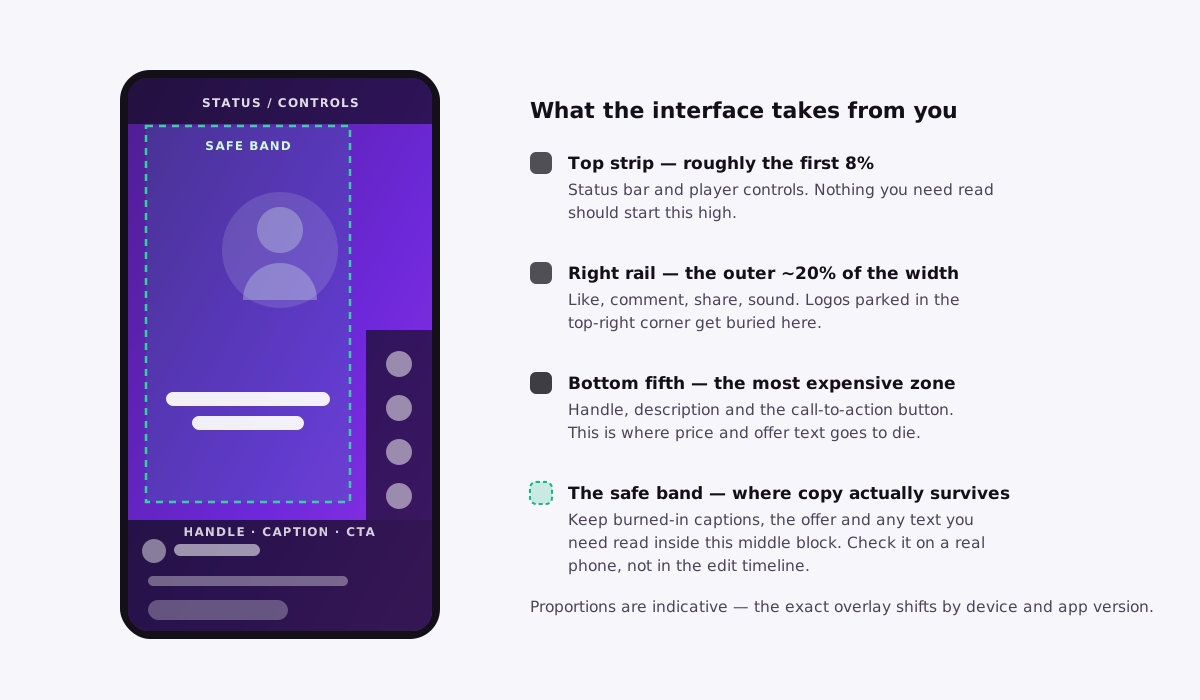
Cut faster than feels right
Early cuts every one to two seconds hold a swiping viewer far better than a single continuous shot, even if the continuous shot is more beautiful.
YouTube vertical video ads: the specs worth getting right
| Spec | What to use | Why it matters |
|---|---|---|
| Aspect ratio | 9:16, full-frame | 4:5 will serve on some surfaces but does not fill a Shorts screen |
| Resolution | 1080 x 1920 | Higher is fine. Lower starts to look cheap on a modern phone |
| Length | 10-30 seconds | Not a platform limit — this is where the creative that works tends to sit. The shorter end holds up better on cold traffic |
| Captions | Burned in, high contrast | Carries the ad for muted viewers and doubles as a second hook |
| Safe zone | Clear of the bottom fifth and right edge | That space belongs to the interface, not to you |
| Audio | Built for sound-on | But it still has to make sense with the sound off |
| Source file | A clean master | Never a re-download from another platform |
Why Shorts inventory is currently cheap
There is a genuine arbitrage here, and it comes from a supply and demand gap rather than from anything clever.
Shorts consumption has grown very fast. Advertiser supply of vertical creative has not kept pace, because most brands still commission a single horizontal hero film and cut everything else out of it. Fewer advertisers competing for a rapidly expanding pool of impressions means the clearing price stays soft. In most markets, Shorts CPMs sit noticeably below in-stream.
If you already run Instagram Reels, you are most of the way there
This is the most under-exploited fact about Shorts advertising. If you are already producing Reels creative for Meta, you own a library of 9:16, sound-on, fast-hook video that was built under exactly the same constraints Shorts imposes. The adaptation work is small.
What to change before you run them
- Strip platform-specific language. 'Link in bio' means nothing on YouTube, and it reads as a recycled asset
- Go back to the master file. A visible Reels or TikTok watermark marks the ad as second-hand and tends to depress performance
- Re-check the safe zones. The Shorts interface does not sit where the Reels interface sits, and text that was clear on Meta can land under a button here
- Swap the call to action to something YouTube can actually deliver, and make sure the clickable element matches what the voiceover is asking for
- Re-test the hook. Reels audiences are often warmer. Shorts prospecting traffic is frequently colder, so a hook that assumed recognition may need to state the proposition outright
Where Shorts fits, and where it does not
Shorts earns its place in some parts of the funnel and actively wastes money in others. The split is fairly clean.
Where Shorts is strong
- E-commerce and app installs
- Top-of-funnel reach, where the cheap CPM does the work
- A retargeting layer against people who already watched something longer
Where Shorts is weak
- A considered or complex sale on cold traffic, as a standalone channel
- High-ticket services or B2B products that need an argument
- Anything requiring a comparison — you cannot build one inside a swipe feed
If the decision needs an argument, the argument belongs in skippable in-stream, and Shorts becomes the thing that keeps you present afterwards at a fraction of the cost.
Shorts buys attention cheaply. In-stream converts it. Asking Shorts to do both, on cold traffic, for a product that takes thirty seconds to explain, is how a perfectly good placement gets written off.
The mistakes that cost the most
- Letterboxing a 16:9 asset into a vertical feed. This single decision explains more Shorts underperformance than everything else combined
- Putting the hook at second five, out of in-stream habit, when the swipe is available at second zero
- Placing the offer or the price under the interface, in the bottom fifth of the frame
- Running Shorts and in-stream blended in one campaign and then judging Shorts on the combined numbers
- Uploading a watermarked download from Instagram or TikTok instead of the clean master
- Expecting a swipe feed to close a considered purchase on the first touch
What we would actually run
- 1
Audit what you already own
If there is a Reels library, that is your first Shorts test and it costs a day of light editing rather than a shoot.
- 2
Build so you can read Shorts separately
Either through placement reporting or by keeping assets and campaigns distinct enough to attribute. You cannot optimise a placement you cannot see.
- 3
Shoot the next round vertical-first
Not vertical-as-an-afterthought. The horizontal cut becomes the derivative, not the master. It is a small change in how a shoot is planned and it removes the letterbox problem permanently.
- 4
Use Shorts for what the price makes it good at
Cheap reach at the top, and cheap frequency against warm viewers at the bottom. Let in-stream carry the part of the message that needs more than a second to land.
That is the whole system. For how this sits alongside the other formats in a full account, see how to advertise on YouTube.
Common questions
Do I need a YouTube channel to run Shorts ads?
Yes, in the sense that the video has to live on a YouTube channel — but it can be unlisted, so it never shows up to subscribers or in your public uploads. You do not need a posting schedule, a content strategy, or any subscribers at all; a channel that exists purely to host ad creative is completely normal. Link that channel to your Google Ads account if you also want view-based remarketing and earned-action reporting.
What do YouTube Shorts ads cost in India?
We will not quote you a CPM, and you should be wary of anyone who does. The clearing price moves with your vertical, how wide your targeting is, the season, and the quality of your creative — the same campaign can cost noticeably more during a festive window than it did a month earlier. What holds is the relationship rather than the number: in most accounts we see, Shorts CPMs sit below in-stream, because advertiser supply of vertical creative has not caught up with how much Shorts people watch. The only benchmark worth having is your own, which means running both placements and reading them separately.
Does Shorts work for a local or service business?
It works for recognition, not for closing. A swipe feed is a poor place to explain a service or win an appointment on a first touch, but it is a cheap way to make a local audience know your name before they need you. The usual mistake is expecting Shorts to produce enquiries directly and switching it off when it does not. Judge it on whether your branded search and direct enquiries move while it runs, not on the conversions the placement reports for itself.
Want someone to run this for you?
We plan, build, and manage YouTube ad campaigns end to end — formats, targeting, creative, and retargeting. Google Premier Partner.
See our YouTube advertising services